

Overview:
This guide provides a comprehensive walkthrough on how to open a support ticket through the HSJ portal. By following these steps, users can efficiently request assistance or report issues directly to the support team. Opening a support ticket enables you to get personalised help, track the status of your inquiries, and access a history of your communications with support. This process is crucial for resolving technical problems, billing questions, or any service-related inquiries you may have.
Prerequisites:
Before proceeding with this guide, ensure that you have:
- An active account on the HSJ portal.
- Access to the internet and a web browser.
Procedure:
- Log In to Your Account
a. Navigate to the HSJ portal homepage.
b. Enter your username and password in the designated fields.
c. Click the “Log In” button to access your dashboard. - Access the Support Section
a. From your dashboard, locate and click on the “Tickets” or “Open a Ticket”.
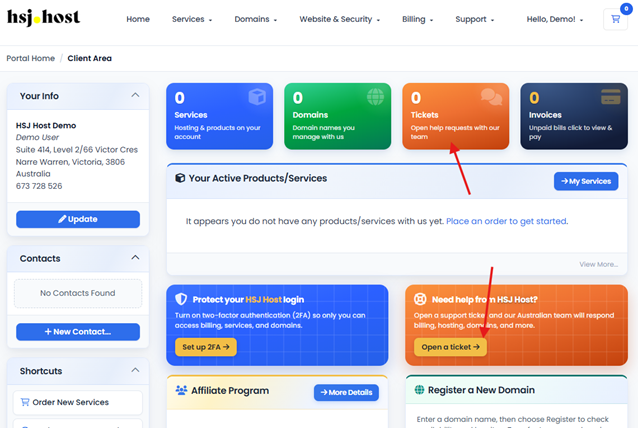
- Fill Out the Ticket Form
a. Choose the relevant category for your issue from the dropdown menu (e.g., Technical Support, Billing, Account Management).
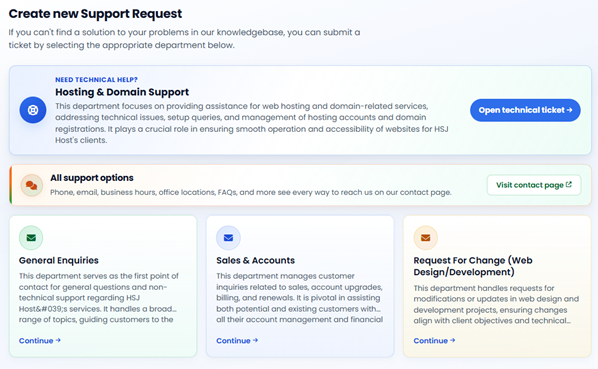
b. Provide a detailed description of your issue or request in the provided text area. Be as specific as possible to ensure a swift resolution.
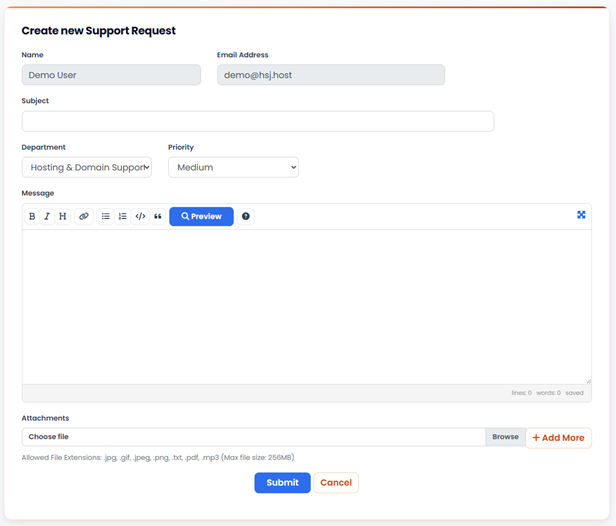
c. Attach any relevant files or screenshots that could help in diagnosing or understanding the issue.

- Submit the Ticket
a. Review your ticket details to ensure accuracy.
b. Click the “Submit” or “Send” button to officially open your support ticket.
Conclusion:
By following the steps outlined in this guide, you have successfully opened a support ticket through the HSJ portal. A member of our support team will review your submission and contact you with further instructions or solutions. Keep your ticket number handy for future reference and tracking. For additional assistance or more complex issues, consider exploring our knowledge base or contacting support directly via phone.